When learning to code, it is easy to get confused by complex tools. Professional editors like VS Code or PyCharm are powerful, but they are often too difficult for beginners. They have too many buttons and settings, which can make learning harder. Thonny IDE was created to solve this. It is a simple tool designed specifically for learning Python, and now you can use it effortlessly right in your web browser.
The Story Behind Thonny
Thonny isn't just another text editor; it is a pedagogical tool developed with a singular mission: to strip away the "black boxes" of programming. It was created by Aivar Annamaa at the University of Tartu in Estonia, a country renowned for its advanced digital education infrastructure. Annamaa realized that students struggle not because the logic of Python is too hard, but because the environment hides what the computer is actually doing.
This struggle often stems from the invisibility of memory management in standard IDEs. When you assign a variable or call a function, the action happens behind the scenes, forcing students to build a complex mental model without seeing the mechanics. Thonny’s breakthrough was to make this hidden state visible. By turning abstract concepts like the heap, stack, and references into concrete visual elements, it bridges the gap between code and concept.
This philosophy of transparency extends beyond the user interface to the tool itself. As an open-source project, Thonny invites users to see not just how their code works, but how the IDE works. It has built a vibrant ecosystem of educators and contributors, ensuring the tool remains focused on learning rather than profit. You can download the full desktop version from the official Thonny website or explore its codebase on GitHub.
A Window into the Machine
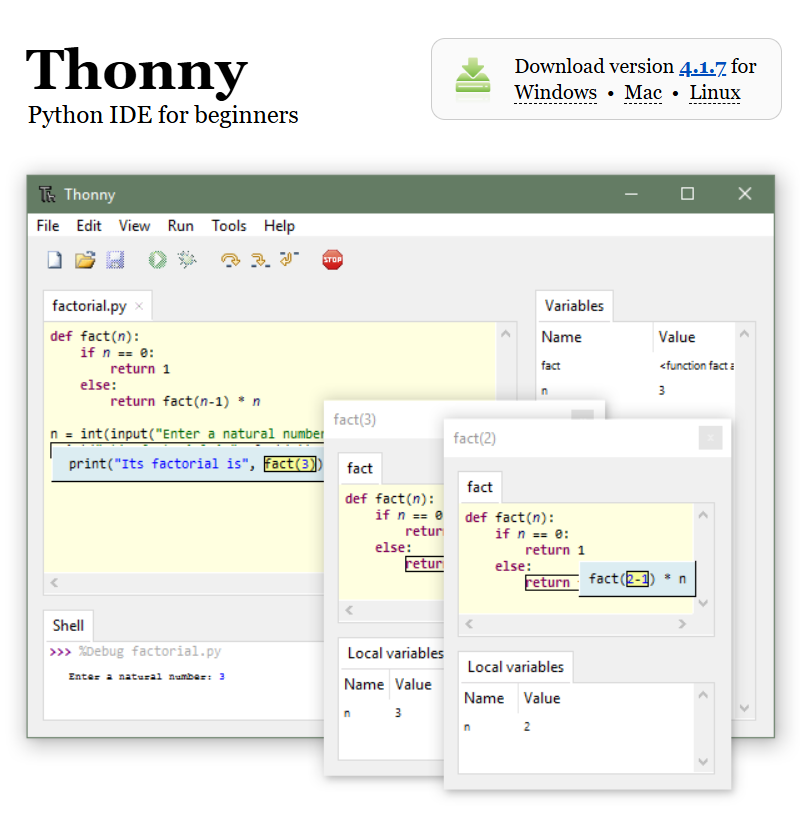
Thonny differentiates itself from every other Python IDE through its suite of visualization features. These aren't hidden in sub-menus; they are front and center.
1. The Variable Inspector
In many classes, a student will write x = 5 and then x = x + 1, and simply stare at the code, unsure if it worked. Thonny provides a persistent Variables table. As the code runs, you see x appear. You see the value flash and change from 5 to 6. This immediate visual feedback reinforces the concept of mutable state, a fundamental pillar of imperative programming.
2. The Visual Debugger
Most debuggers are designed for finding bugs. Thonny's debugger is designed for explaining logic. It allows you to run your program step-by-step with a crucial twist: it doesn't just step over lines; it steps through expressions. If you have result = (a + b) / 2, Thonny will painstakingly show you a + b being calculated first, then the result being divided. It unrolls the order of operations visibly, clearing up confusion about operator precedence instantly.
3. Memory Model: Heap and Stack
One of the hardest hurdles in Python is understanding references—knowing that a = [1, 2] and b = a means both variables point to the same list. Thonny's Object Inspector allows users to see the memory address (ID) of variables. It visually demonstrates the difference between creating a new object and referencing an existing one, turning a notorious trap for beginners into a clear lesson.
4. Syntax Error Detection
Beginners often miss a closing parenthesis or a quote. Thonny’s parser (the Assistant) doesn’t just throw a generic SyntaxError. It often provides a helpful, human-readable hint about what is missing and where, acting like a gentle tutor sitting beside you.
These are just the highlights. Thonny is packed with other thoughtful features like code completion, highlight of matching parentheses, and a simple pip GUI for installing packages. Every detail is carefully chosen to support the learner's journey without overwhelming them.
Thonny IDE Online: The Browser-Based Alternative
Despite its desktop success, Thonny still faced one final hurdle: the barrier of installation. In many educational environments, such as schools with Chromebooks or libraries with locked-down computers, users cannot simply run an installer. Teachers lose valuable class time simply trying to get Python running on thirty different machines. To address this friction and make Python truly accessible to everyone, everywhere, we developed Thonny IDE Online.
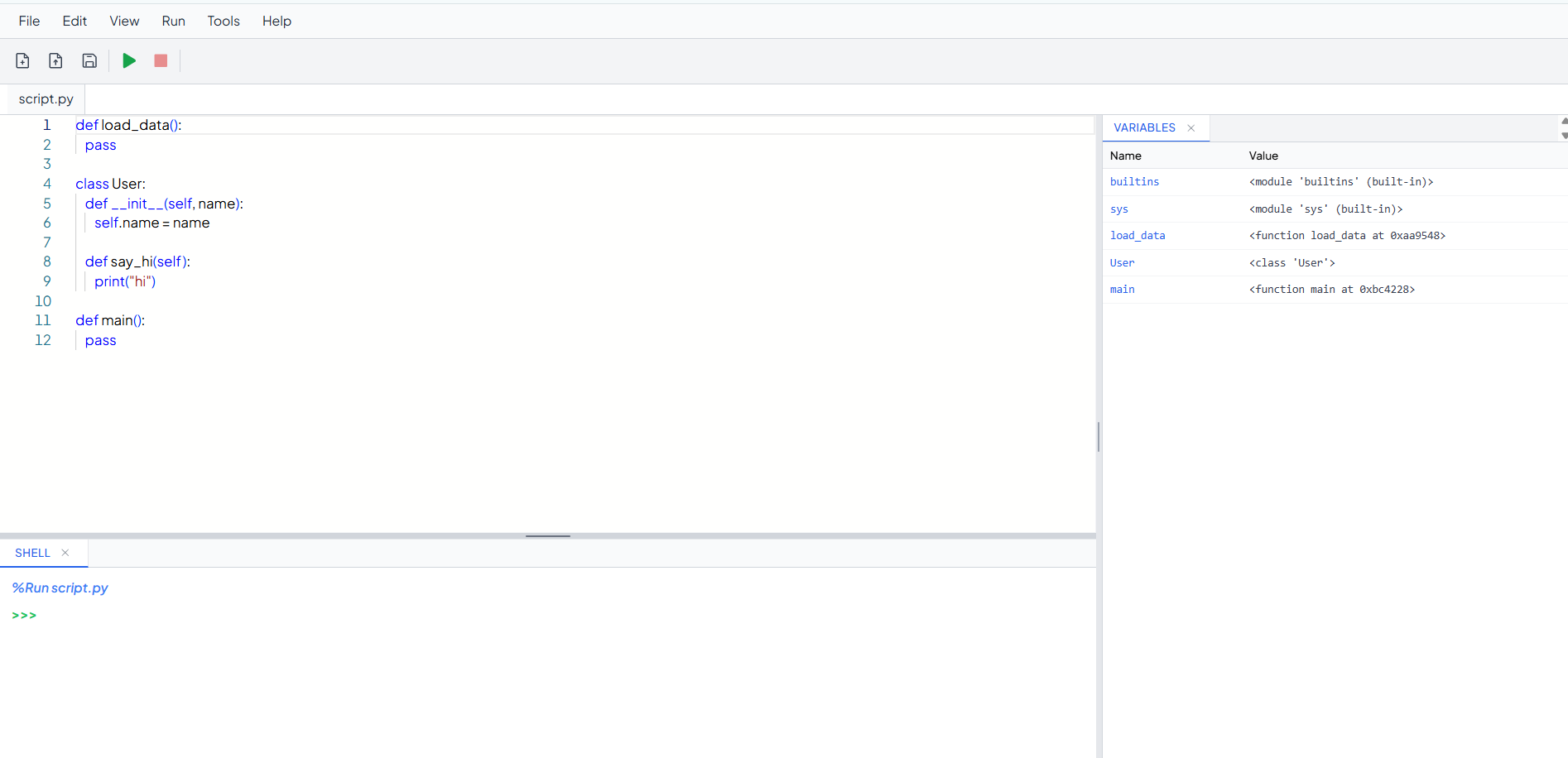
As you can see from the screenshot, the online version retains the clean, distraction-free interface that made the original styling so effective. All the familiar tools—the toolbar, the shell, the assistant—are exactly where you expect them to be, ensuring a seamless transition for anyone familiar with the desktop application.
Thonny IDE Online ports the core philosophy of Aivar Annamaa's creation directly to the web browser. Powered by WebAssembly and the Pyodide engine, it runs a full Python kernel locally in your browser tab. This technology is a game-changer:
Zero Setup: There is nothing to download. No .exe, no pip install. You open the URL, and you are ready to code in seconds.
Privacy Focused: Unlike cloud-based repls that send your code to a remote server, Thonny IDE Online executes entirely on your device. Your code never leaves your browser, making it faster and more private.
Integrated Tools: We have faithfully recreated the Variable Inspector to keep that vital feedback loop intact. We also added a Magic Plotter, which automatically graphs numeric output. This feature is huge for engagement—students can generate sine waves or random noise graphs simply by printing numbers, without needing to learn the complexities of libraries like Matplotlib.
Package Management: Unlike simple online compilers, Thonny IDE Online includes a full package manager. You can easily install popular libraries like pandas, numpy, or scipy directly within the browser environment. This opens up the possibility of teaching data science and advanced algorithms without leaving the tab.
Program Structure: For more advanced learning, we include a Program Tree view that visualizes the Abstract Syntax Tree (AST) of your code. This helps students understand how the interpreter parses their instructions, bridging the gap between text and execution logic.
Smart Navigation: As your code grows, so does the complexity. The Outline view helps students navigate larger scripts by visualizing functions and classes in a tree structure. Additionally, the built-in TODO scanner automatically finds comments marked with # TODO, teaching students the professional habit of documenting their unfinished tasks.
Persistent Workspace: We understand that learning takes time. Your files are automatically saved to your browser's local storage, meaning you can close the tab and return later without losing your work. You can manage multiple files, switch between them with tabs, and even upload local scripts from your computer.
We hope that Thonny IDE Online proves to be a useful tool for your learning or teaching needs. We are actively working on the application and will continue to release more updates and features to enhance the experience. Our goal is to keep removing barriers so you can focus entirely on the joy of programming.